There are three types of data mappings used in EQuIS EDD formats: Direct, Default, and Method.
Direct Mappings
These fields write the populated value provided in the EDD to a field (or fields) in the EQuIS Schema. There are two types of direct mappings:
1.Standard – The most typical mapping type, standard mappings can be populated with any value. There are some restrictions, such as data type (varchar, numeric, etc.), field length, and uniqueness, but formats will accept any value that is populated in these fields and map it to the corresponding field in the database.
Example: LabSample_v1.sys_sample_code in the EQEDD format. This field is constrained to be unique and is limited to 40 characters, but can otherwise be populated with any string value desired. The populated value will map directly to DT_SAMPLE.SYS_SAMPLE_CODE in the database.
2.Lookup – This mapping type restricts the set of valid values to those it obtains from its reference data source. There are two sources from which a lookup field may obtain its set of valid values:
a.An EQuIS reference table (or a reference value file in the case of EDP Standalone).
Example 1: Location_v1.elev_unit in the EQEDD format is a lookup to RT_UNIT.UNIT_CODE. Any value populated in this field must already exist in RT_UNIT.UNIT_CODE in the database to avoid error.
Example 2: Well_v1.sys_loc_code in the EQEDD format is a lookup to DT_LOCATION.SYS_LOC_CODE. Unlike Example 1 above, the value populated in this field does not necessarily have to already exist in the database to avoid error. If the value does not exist in the database but does exist in Location_v1.sys_loc_code in the EDD, the format will accept it as a valid value. This is because on the Create step, a DT_LOCATION table record for the location code will be created and thus an orphan row error will be avoided.
a.An enumeration.
Example 1: Lithology_v1.moisture in the EQEDD format pulls its list of valid values from the format’s ‘moisture’ enumeration. This is a list of hard-coded valid values that are defined in an *-enum.xml file in the format *.zip package, rather than in a database reference table.
Example 2: LOCATION.PROXIMITY in the NEDDCommon format pulls its list of valid values from the format’s ‘proximity’ enumeration. The enumeration, defined in the *-enum.xml file, uses values that are accepted in the NIRIS schema.
Default Mappings
These mappings do not rely on any input from the user. They map the same hard-coded value to the same field(s) in the database each time an EDD that writes to the same table as the default mapping is committed to the database. This could be necessary due to a format standard/assumption or may be configured to populate a field required by the EQuIS Schema that the data provider may not be expected to populate.
Example: FieldResults_v1 in the EQEDD format contains a default mapping of ‘FIELD’ to the DT_SAMPLE.SAMPLE_SOURCE database field. Because this section is designed specifically for field samples, it is not required that users populate a sample_type_code field, such as in LabSample_v1. Rather, the default mapping removes the onus of populating an extra field when it will always be the same.
Method Mappings
The most involved of all mappings, method mappings use logic to determine what value is mapped to the database.
Note: The easiest way to identify the behavior of a particular method mapping is to create a test row in Professional EDP, populate the required fields and any additional field you believe may be involved in the method mapping, and Create the package. Once the package has been created, preview the resulting database entries in the Package by clicking the [Database]\[Facility] button in the bottom left-hand corner of EDP. In the package, navigate to the data table in question and analyze how the data have been transformed. |
Most method mappings typically fall into one of the following categories:
Get – All format sections that write to database tables that are children of parent tables have Get methods to obtain the value that will link the child record to the appropriate parent.
Example: GetSampleID in the TestResult_v1 section of the EQEDD format. This method uses the SYS_SAMPLE_CODE value to find the parent DT_SAMPLE record that has been created and returns to sample_id value to populate in DT_TEST.SAMPLE_ID.
Create / GetCreate / Check – New database records often leverage unique IDs to prevent duplicate records from being committed to the database. To ensure uniqueness, EDP will generate a unique numeric identifier to assign to the new record. Before it generates a new number, the format will check other EDD records and the database to make sure that the new record does not match any existing records on the Primary Key. If it does, the method returns the existing ID. If not, it creates a new ID.
Example 1: CreateSPMContractID in the DT_SPM_Contract section of the SPM format creates a new SPM_CONTRACT_ID value if it cannot find an existing record in the DT_SPM_CONTRACT table that matches on the Primary Key.
Example 2: GetCreateSPMSampleID in the Planned_Sample_Result section of the SPM format creates a new SAMPLE_ID value if it cannot find an existing record in the DT_SPM_PLANNED_SAMPLE table that matches on the SYS_SAMPLE_CODE.
Example 3: CheckChainOfCustody in the FieldSample_v1 section of the EQEDD format checks the COC_v1 section of the EDD and the DT_CHAIN_OF_CUSTODY table in the database to verify whether the populated value already exists. If it does, the existing ID is returned. If it does not, a new ID is created.
Reference Value – Users can use formats to create new reference values, but these reference values are often written to tables that have required fields that are lookups to other reference value tables. When this happens, certain method mappings will ensure that the value being written to a lookup field in the database is also populated in the parent table.
Example: CompanyType_SUBCONTRACTOR in the DrillActivity_v1 section of the EQEDD format creates a new record in the RT_COMPANY_TYPE table where COMPANY_TYPE = SUBCONTRACTOR because new RT_COMPANY table records created in this section of the format will have a COMPANY_TYPE value of SUBCONTRACTOR.
Reformat – Certain formats allow for data to be submitted in a format that is incongruent with the specifications of the EQuIS Schema. When this occurs, the format will use a method mapping to reformat the value so that it may be committed to the database without error.
Example: GetSampleDate in the EFW2FSample section of the EFWEDD format takes the values populated in the sample_date and sample_time fields and concatenates them before populating the resulting value in DT_SAMPLE.SAMPLE_DATE. The format permits the 2 values to be populated in separate fields, but the database Schema requires that they be populated together in the same field.
Calculation – In certain situations, it is not necessary that the user populate every value that will be committed to the database because there is enough information in other fields for certain values to be extrapolated. In these situations, EDP will calculate the value so that the user does not have to.
Example: GetEndDate in the Scheduled_Task_Update section of the SPM format calculates the end date value using the values populated in the revised_scheduled_date and duration_days fields.
Default – Some database fields are required to be populated to avoid errors elsewhere in EQuIS. These fields might not be required in the format or in the database, but it is best that they are populated with at least some default value. The default value can be overridden by populating the field in the format, but if the field is left blank, then EDP will fill in the field itself.
Example: GetDurationValue in the Planned_Task_Commitment section of the SPM format populates DT_SPM_PLANNED_TASK.DURATION_VALUE with ‘1’ if the duration_value field is left blank. Every task in SPM must have a specified duration, so this method prevents that field from being left blank.
One-offs – Not all method mappings fit into one of the above categories. Often times more specialized formats require unique data manipulation to comply with the target workflow. For questions about any method mapping that does not appear to fit within one of the standard categories, please reach out to Support@EarthSoft.com.
Example: GetSampleSysSampleCode in the Sample_Lab section of the ERPIMS format. The ERPIMS specifications allow both a lab sample ID and a field sample ID to be reported. Because DT_SAMPLE in the EQuIS Schema only has room for 1 sample code, the format looks to RT_SAMPLE_TYPE.SAMPLE_TYPE_CLASS and maps either the field or lab sample ID based on the returned value.
Example of Various Mapping Methods
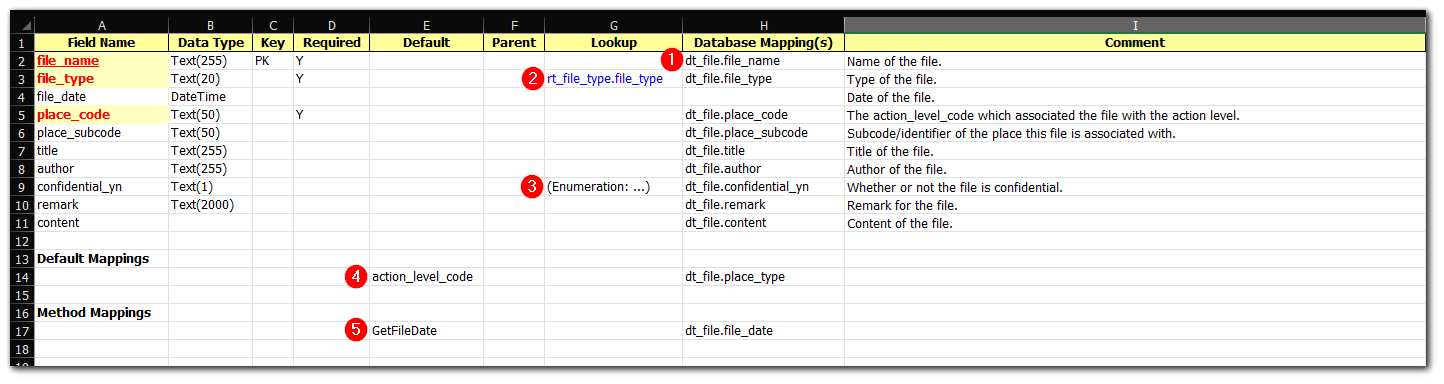
A format’s description file can be used to see how/where each type of mapping is used. Below is a screenshot of the Files section of the ActionLevels format where the mapping types defined above can be seen on the display.
1.Standard mapping
2.Reference table lookup
3.Enumeration lookup
4.Default mapping
5.Method mapping