EQuIS supports a completely digital workflow for analytical data to maximize efficiency and minimize possible transcription errors. The workflow includes planning, field data collection, sample analysis, reporting, and/or visualization of data. The image below illustrates possible components of the digital workflow that an organization could use.
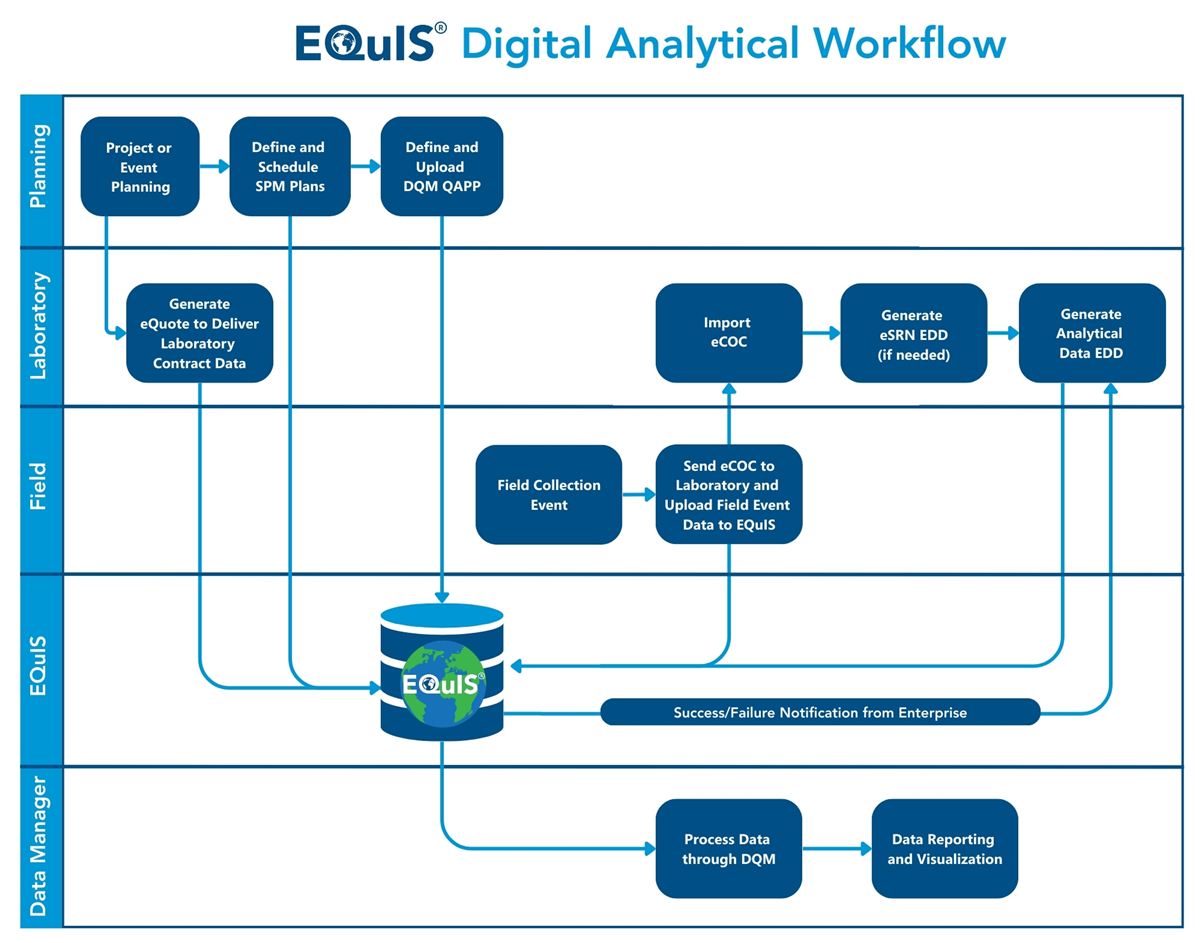
Several electronic touch points occur in the analytical workflow between an organization using EQuIS and an environmental laboratory. The laboratory must have its Laboratory Information Management System (LIMS) setup to accept and use the various EQuIS formats and to produce electronic data deliverables (EDDs).
The EQuIS Sample Planning Module (SPM) is a key component of the EQuIS analytical data workflow and works in tandem with EQuIS Collect or the EQuIS Data Gathering Engine (EDGE) for digital field data collection. SPM components include eQuotes, eCOCs (Chain of Custody), and eSRNs (Sample Receipt Notifications). The EQuIS Data Qualification Module (DQM) can also be incorporated into the digital analytical workflow.
eQuote – After project analytical requirements are communicated to the laboratory, the laboratory generates an electronic quote (eQuote). The eQuote contains the list of methods, analytes, units, containers, and method groups. These data are then uploaded to EQuIS and used for sample planning purposes in SPM.
eCOC – After collecting samples in the field, an electronic Chain of Custody record is generated using EQuIS Collect and submitted to the laboratory for upload to their LIMS. Digital data transactions are checked and confirmed prior to the receipt of the physical samples. EQuIS digital eCOCs offer a single format that is laboratory agnostic. The eCOCs are pre-populated prior to personnel going out in the field and are digitally transmitted to EQuIS and/or the project laboratory after sample collection is completed. Where regulations allow, paper versions of the eCOC are eliminated.
While project requirements might dictate printing, signing, and including a physical hard copy of a COC record for inclusion with a shipment of samples, this requirement does not preclude the export and distribution of the digital eCOC (minus signature) to the laboratory. While the laboratory may need to review and reconcile any differences between the physical hard copy COC with the eCOC, the import of the eCOC expedites data upload and reduces data input errors by laboratory personnel.
eSRN – After receipt of the samples at the laboratory, the laboratory generates an electronic sample receipt notification (eSRN) that lists the samples received, analysis registered, and documents any receipt issues. The eSRN is uploaded to EQuIS and a report is generated comparing the data from the eCoC.
EDD – EDD(s) containing data collected in the field will be uploaded directly to EQuIS from Collect or EDGE. Following sample preparation and analysis, the laboratory creates EDD(s) in the specified EQuIS format and submits the file(s) to EQuIS. EQuIS checks these EDDs for correctness and provides detailed information on the EDD.
Organizations can have their workflow configured to use Enterprise EDP and automate the checking of EDDs from data providers. This allows automatic notification of the success or failure of the EDDs to pass checks and upload to EQuIS.
After the EDDs have successfully uploaded to EQuIS, then the SPM Completeness Reports can be run to track project field and lab data based on the SPM plan and laboratory invoices can be managed. If DQM is part of an organization's workflow, the analytical data can be validated with DQM. Once all the data are in EQuIS (and validated), then the plethora of EQuIS analysis, reporting, and visualization tools can be used with the data.